A header image for a blog about the most popular Lego set in every U.S. state.

 The Most Popular Lego Set in Every State

Whether you’re building sprawling starships or intricate architectural replicas, Lego sets have become a go-to creative escape for builders of all ages. At MRO Electric, we’re builders and problem-solvers at heart, so we were curious which sets were capturing the most attention nationwide. To find out, we analyzed Google Trends search data from the past 12 months, comparing interest levels for the 50 best-selling Lego sets across all 50 states. 

The results reveal a colorful mix of fan-favorite franchises and ambitious display pieces that continue to spark imagination years after their initial release. Whether residents gravitated toward massive builds like the Eiffel Tower or pop-culture favorites like the Millennium Falcon, every state had a standout Lego set that captured its interest.

Each State’s Top-Searched Lego Set
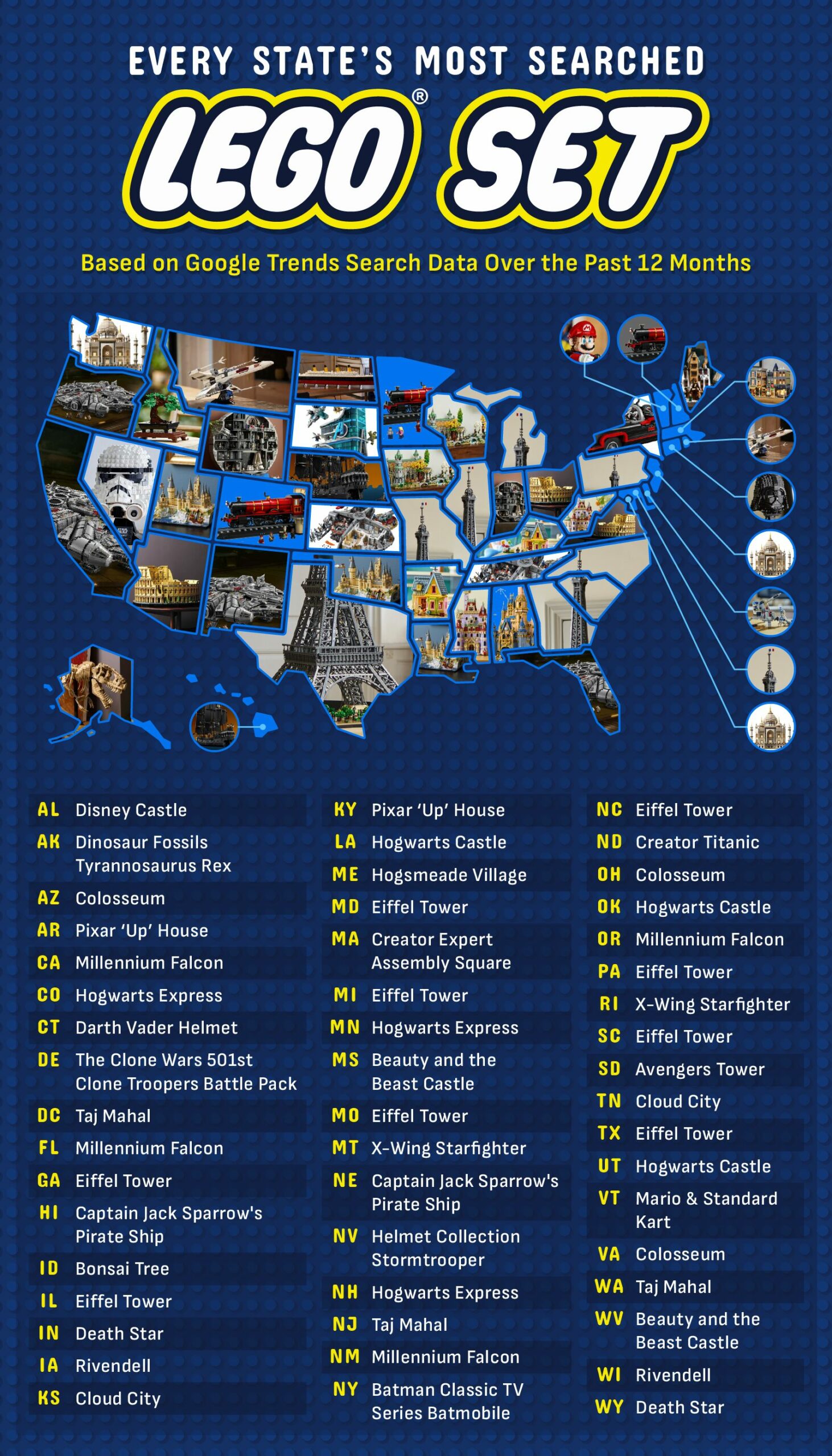
A map of the U.S. showing the most popular Lego set in each state.

Across the country, regional preferences reveal clear patterns in the types of Lego sets Americans most often searched for. Star Wars emerged as a major force in many western and southwestern states, with searches centering on iconic builds like the Lego Millennium Falcon and the Lego Death Star. Sets like Cloud City also stood out, showing the franchise’s widespread appeal in states with large fan conventions and strong sci-fi communities.

In contrast, the Northeast and Mid-Atlantic regions showed a strong affinity for the Lego Architecture line, with many states in these regions favoring builds like the Lego Eiffel Tower and the Lego Colosseum. This regional cluster suggests an appreciation for large-scale display pieces, particularly in states where urban centers and design-focused culture may inspire interest in detailed architectural models.

Meanwhile, Harry Potter maintained a devoted following in pockets across the country. Fans in Colorado, Minnesota, and New Hampshire searched most for the Lego Hogwarts Express, while Louisiana, Oklahoma, and Utah showed a strong preference for the Lego Hogwarts Castle. Maine leaned toward the Lego Hogsmeade Village, highlighting how different chapters of the franchise resonate uniquely with local fans.

The South displayed some of the most varied interests. Alabama favored the Lego Disney Castle, while Arkansas and Kentucky gravitated toward the whimsical Lego Pixar “Up” House. Mississippi and West Virginia stood out for their searches for the Lego Beauty and the Beast Castle, adding to Disney’s strong footprint in the region.

A few states chose clear outliers: Idaho residents searched most for the iconic Lego Bonsai Tree, part of the Botanical Collection, while Vermont favored the Lego Mario & Standard Kart set. North Dakota stood alone in favor of the Lego Titanic set, and both Hawaii and Nebraska showed the most interest in Lego Captain Jack Sparrow’s Pirate Ship, a standout favorite within the Pirates of the Caribbean franchise.

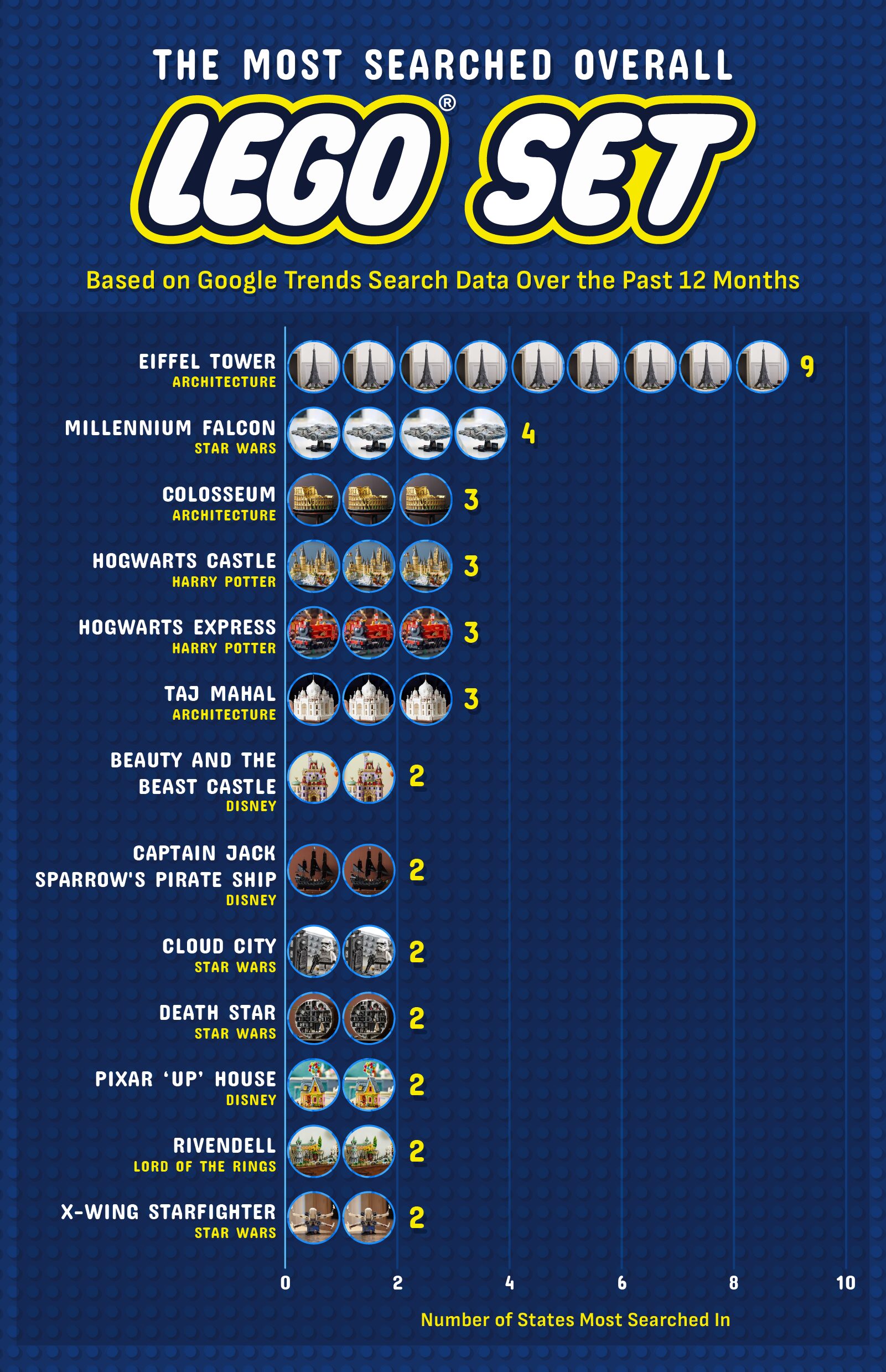
A table showing the most popular Lego sets nationally, their corresponding franchise/film, and the number of states that search the most for each.

The most popular Lego sets in the U.S., overall, are:

  • Lego Eiffel Tower — Lego Architecture: topped 9 states
  • Lego Millennium Falcon — Star Wars: 4 states
  • Lego Colosseum —  Lego Architecture: 3 states
  • Lego Hogwarts Castle — Harry Potter: 3 states
  • Lego Hogwarts Express — Harry Potter: 3 states
  • Lego Taj Mahal — Lego Architecture: 3 states

The clear nationwide favorite is the Lego Eiffel Tower, released in 2022, which ranked as the most-searched set in nine states, the highest total of any build in the dataset. As one of Lego’s tallest and most intricate display pieces (and with a retail price of $629.99), its popularity reflects the growing demand for large, architecturally inspired sets that double as décor.

In second place is the iconic Lego Millennium Falcon from Star Wars, the top search in four states. A longtime favorite among collectors, this flagship remains one of Lego’s most recognizable sets and one of its priciest, with the UCS version retailing at $849.99. Lego has released several versions of the Millennium Falcon set since 2000.

Just behind it are four sets tied for third place: the Lego Colosseum, Lego Hogwarts Castle ($469.99), Lego Hogwarts Express, and Lego Taj Mahal, each leading searches in three states. These builds blend fantasy and real-world landmarks, showing how both imaginative worlds and historical icons capture builders’ attention.

Rounding out the list are seven sets tied for fourth place, each topping searches in two states. These include Disney favorites like the Lego Beauty and the Beast Castle and the Lego Pixar “Up” House, Star Wars builds such as Lego Cloud City, Lego Death Star, and Lego X-Wing Starfighter, as well as standouts like Lego Rivendell and Lego Captain Jack Sparrow’s Pirate Ship.

Closing Thoughts

Whether it’s the architectural precision of the Eiffel Tower, the cinematic nostalgia of the Death Star, or the cozy charm of the house from Pixar’s “Up,” Americans gravitate toward sets that reflect their imaginations, interests, and sense of escape.

And just as Lego builders rely on sturdy foundations and precise engineering to bring their creations to life, manufacturers and engineers depend on reliable systems to keep their operations running. At MRO Electric, we help ensure those systems stay strong by repairing and supplying high-quality industrial automation components — including drives, PLCs, HMIs, and more — from trusted brands featured in our full product catalog. If you’re ready to strengthen your system’s performance, contact us today.

Methodology

We identified each state’s most popular Lego set by analyzing Google Trends search data from the past 12 months across all 50 states and the District of Columbia. Using a list of 50 of the most-owned and best-selling Lego sets, we compared search interest for each and selected the set with the highest relative search volume in each state. 

Sources Used to Compile Lego Set Search Terms:

Fair Use

You are welcome to use, reference, and share non-commercial excerpts of this study with proper attribution. If you cite or cover our findings, please link back to this page so readers can view the full methodology, charts, and context.

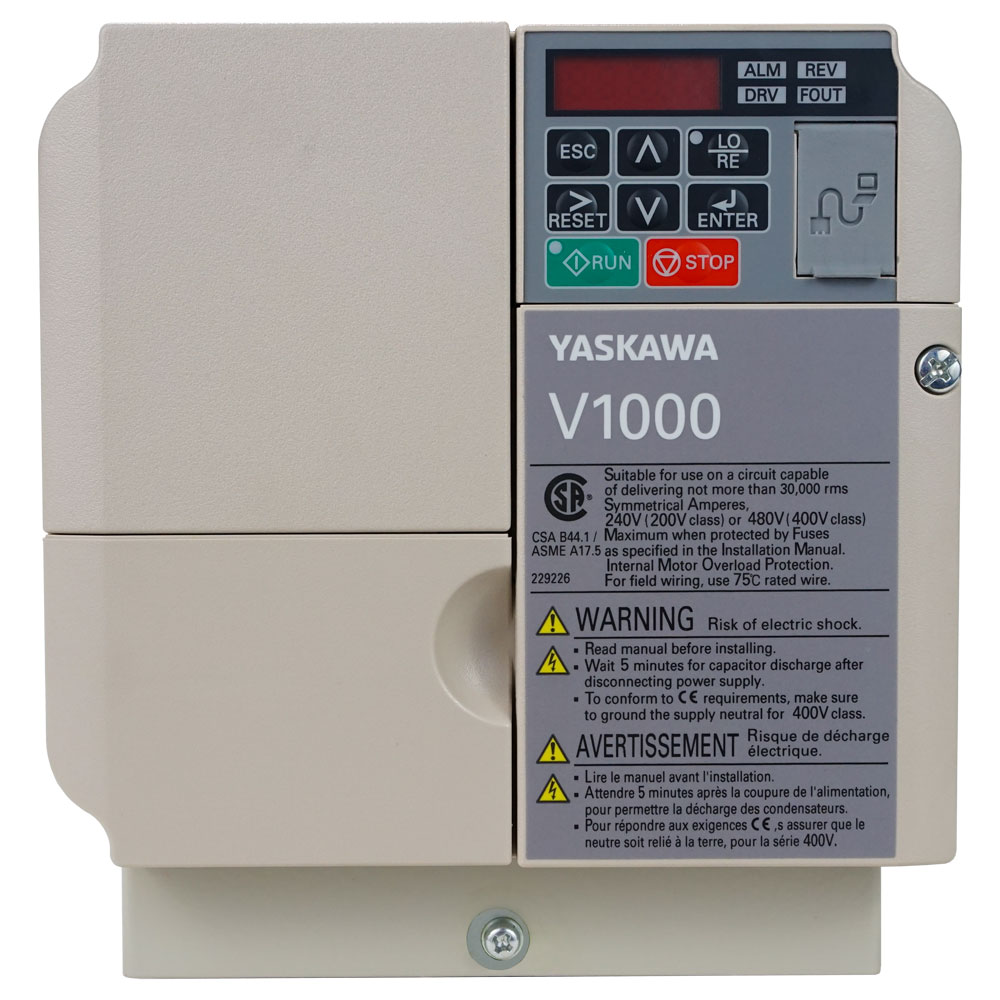
Key Specs of the V1000 Series AC Drive

In industrial automation, the core of any motion control system is the AC drive. It’s the brain and brawn behind your motors, dictating everything from speed and torque to energy efficiency. If want drive that balances performance with ease of use then the V1000 Series is a solid drive!

Whether you’re an engineer, a machine builder, or a plant manager, understanding the key specifications of your components is crucial. Today, we’re spotlighting the V1000 Series and exploring features that make it ideal for a wide range of applications.

Read more: Key Specs of the V1000 Series AC Drive


The V1000 Series Identity

he V1000 is a compact, versatile, general-purpose AC drive designed for 3-phase asynchronous motors. It’s built to deliver reliable performance in applications like conveyors, pumps, fans, mixers, and packaging machinery. But don’t let its “general-purpose” label fool you—it’s packed with features that punch well above its weight class.


Key Specs of the V1000

Scalability of Power Range

The V1000 is designed for a broad range of standard power supplies, covering 200-240V (single and three-phase) and 380-480V (three-phase) classes. This flexibility makes it suitable for facilities worldwide. Additionally, the power range typically extending from sub-horsepower (e.g., 0.5 HP / 0.4 kW) up to several hundred horsepower (e.g., 100 HP / 75 kW), there’s a V1000 model for both small machines and heavy-duty industrial systems.

Advanced Control Methods

The V1000 features sensorless vector controls, which provides high starting torque (over 150% at 0.3 Hz) and excellent speed regulation without needing a feedback encoder. Perfect for applications requiring high torque at low speeds or improved dynamic response. Along with that, this series offers several pre-set V/f patterns for optimal motor performance.

Integrated Features & Functionality

One of the most defining features of the V1000 is its all-in-one design. The built-in PLC functionality
allows for simple logic operations and timer/counter functions without an external PLC. Automate basic sequences directly from the drive, saving on hardware and wiring costs.

Additionally, this series includes standard built-in communication. This makes it easier for the V1000 to be integrated into a larger control network for monitoring and control from a central SCADA or PLC system. Most models have an EMC filter built in, ensuring compliance with electromagnetic compatibility standards, reducing electrical noise interference and simplifying installation.


Key Enhancements

The V1000 comes with certain key features that result in a more enhanced experience, some examples of these features include:

Auto-Tuning, which means the drive can automatically identify motor parameters (for standard 3-phase motors), optimizing its control performance from the start and ensuring smooth, efficient operation.

A wide speed range, with a speed control range of 1:40 (in V/f mode) and an impressive 1:200 (in Sensorless Vector mode), the V1000 provides precise control across a vast operating window.

Finally, the V1000 has robust protections, which includes comprehensive protection features like overload (150% for 60 seconds), overcurrent, overvoltage, undervoltage, and motor overheating protection, safeguarding your valuable equipment.


Conclusion

In conclusion, the V1000 Series AC Drive is more than just a variable frequency drive. It’s a comprehensive motion control solution engineered for reliability, simplicity, and performance. Its key specs—from its flexible power range and advanced Sensorless Vector control to its game-changing built-in features—make it an incredibly smart investment for optimizing your machinery and processes.


In Need of a V1000?

Ready to experience the V1000 difference? Contact us today to speak with an expert

Installing a Control Techniques UNI2403 Drive

The Control Techniques UNI2403 is a robust and versatile variable frequency drive (VFD), part of the renowned UNI series designed for controlling 3-phase AC motors. Its reliability in applications from conveyors and pumps to fans and packaging machinery is well-established. However, like any sophisticated piece of power electronics, its long-term performance and reliability are directly tied to the quality of its installation.

A proper installation is more than just connecting wires; it’s about ensuring safety, optimizing performance, and guaranteeing a long, trouble-free service life. This article outlines the critical best practices for installing your UNI2403 drive.

Read more: Installing a Control Techniques UNI2403 Drive
UNI2403

Pre-Installation

They say a little planning goes a long way. This saying is applicable when it comes to installing drives. Both temperature and location play important factors in trying to figure out where to install your UNI2403. Ideally, you want the drive installed in a cool and ventilated environment to avoid overheating the drive.

Another thing to consider is if the location you’re installing the drive in is easily accessed by contaminates. Try to avoid places that gather large amounts of contaminate like dirt, dust, grime, and grease. Often these contaminates accumulate and build up in the drive overtime which then leads to overheating.

Observe Safety Procedures

Before starting any work, ensure the entire system is electrically isolated. Lock Out, Tag Out (LOTO) the main power supply to prevent accidental re-energization.

After disconnecting power, wait for the specified time (refer to the manual) for the DC bus capacitors to fully discharge. The UNI2403 has a status LED that indicates charge; never rely on this alone—always measure the voltage at the DC bus terminals with a multimeter to confirm it is safe (<50V DC).

Another crucial safety measure is to ensure you have a proper, low-impedance safety ground (protective earth) connection point ready. Current travels the path of lease resistance and having a direct line to the ground ensure that it will prioritize using the ground line as opposed to traveling through the body of the operator.

Installing the Drive

Power Wiring

When installing the UNI2403, a few critical steps should be following to ensure proper operation and avoid potential catastrophic failure. For starters make sure to use the proper gauged wire and that they are hooked up to proper input/output terminals. One common disastrous consequence comes from people mixing up the input/output terminals. Additionally, it is also important to make sure that terminal screws are tightened to spec to avoid potential arcing.

Motor and Control Wiring

When doing an installation, it is mandatory for all control wiring (analog inputs, digital I/O, encoder feedback, etc.), use shielded twisted-pair cables. This is the single most effective way to prevent electrical noise from causing erratic operation.

Make sure to connect the cable shield to the PE (ground) terminal at the drive end only. Do not connect the shield at both ends, as this can create ground loops. Use clamp-type EMC cable glands for a 360-degree shield connection.

Finally, route control and signal cables in separate conduits or trays away from power cables. You can cross your cables at a 90-degree angle to minimize inductive coupling. However, only do this if crossing is absolutely unavoidable.

If Applicable

If your application requires rapid deceleration (e.g., a high-inertia load), you will need an external braking resistor. Connect it to the dedicated B2 / B1 terminals, ensuring the resistor is correctly sized and mounted outside the enclosure with proper ventilation, as it generates significant heat.

Starting Up (Post Installation)

You’ve gone through your pre-install checklist and have correctly wired everything together. Now comes the part of starting up the drive! Before you start up the drive, make sure to verify once more that all connections are tight and there are no random tools or bits of metal hanging out in the drive. If it all checks out then crank up the power.

Once the power is on then you can start to the process of programming the parameters for the motor. (Do Not Connect the Motor Yet!)


Begin by connecting the motor, program the drive with the motor’s nameplate data (Voltage, Current, Frequency, Speed) using the built-in keypad or commissioning software like Control Techniques’ Commissioning Tool. This allows the drive to optimize its control and provide accurate motor protection.

During the start up, you can set basic parameters such as min/max speeds and acceleration and deceleration ramps. You can also set control source such as keypads, analog or digital input devices.


Test Run and Final Checks

End your installation with a test run. Start with a low-speed, no-load test run. Listen for unusual motor noise (e.g., bearing currents) or vibration. Afterwards, verify the motor rotates in the correct direction. Finally, gradually test the full operating range and check that the drive responds correctly to all control signals.

If all these things check out, then CONGRATULATIONS! You have successfully installed a UNI2403 Drive!


Common Issues to Avoid

  • Ignoring EMC Guidelines: Poor EMC practices are the leading cause of “ghost” problems—unexplained faults, communication errors, and erratic analog signals. Proper shielding and grounding are not optional.
  • Using an AC Line Bypass Incorrectly: When installing a bypass contactor, ensure it is interlocked so it cannot connect the line power directly to the drive’s output terminals while the drive is active.
  • Neglecting the Braking Resistor: Overloading the drive’s internal braking capability is a common cause of overvoltage faults and drive failure.

Conclusion

Installing a Control Techniques UNI2403 drive correctly is a systematic process that prioritizes safety, mitigates electrical noise, and ensures thermal management. By following these best practices—from careful planning and proper wiring to meticulous commissioning—you are not just completing a task; you are investing in the reliability, efficiency, and longevity of your motor-driven system. When in doubt, the UNI2403 Installation and Commissioning Manual is your most valuable resource. Always consult it for model-specific details and technical specifications.

If you’d like to read more about operating a UNI2403, this article goes into basic operation procedures.


Need a UNI2403?

Does your operation need a UNI2403 or other Control Techniques drive? Reach out to our team of professionals and let us help you find the drive you need to keep your business going!

A header graphic for a blog about the most common fear in every U.S. state.

What Are the Most Common Fears in Every U.S. State?

From snakes in the grass to things that go bump in the night, fear is a universal experience — but what Americans are most afraid of depends on where they live. To find out which phobias haunt different corners of the country, we surveyed more than 2,400 people to uncover the most common fears in every U.S. state. The results reveal everything from timeless anxieties, such as public speaking, to spooky seasonal terrors, as well as larger societal worries that keep people up at night.

Whether you dread spiders, losing your job, or stepping on stage in front of a crowd, this state-by-state breakdown sheds light on the fears that shape our daily lives — and shows just how much we have in common, even when it comes to what scares us most.

Key Findings

  • More Americans fear public speaking (32.3 %) than snakes (30.7 %).
  • Americans are more afraid of spiders than of exorcisms, possession, or ghosts.
  • Societal fears, such as losing rights or liberties and the fear of nuclear war, dominate in most U.S. states.

Phobias That Haunt Every State

Alt Text: A map of the U.S. showing the most common classic fear or phobia in each state.

Most Common Classic Fears or Phobias Nationwide:

  • Fear of heights — 50.2%
  • Fear of public speaking — 32.3%
  • Fear of enclosed/small spaces — 32.1%
  • Fear of snakes — 30.7%
  • Fear of water (deep water, oceans, etc.) — 24.0%
  • Fear of needles — 13.9%
  • Fear of flying — 12.5%
  • Fear of open/crowded spaces — 11.8%
  • Fear of the dark — 10.8%
  • Fear of blood — 7.3%
  • Fear of holes — 5.8%
  • Fear of dogs — 2.2%
  • Fear of cats — 0.6%

When it comes to everyday phobias, Americans aren’t most worried about snakes or small spaces — it’s heights that top the national list, with just over half of respondents saying they feel uneasy when they’re up high. Right behind are fears that hit closer to home: nearly one in three people fear public speaking (32.3%) or enclosed/small spaces (32.1%). Snakes (30.7%) and deep water (24%) also remain common sources of anxiety, but the data shows that human interaction and environmental context often scare us more than wildlife.

Breaking it down further, Gen Z and millennials are more afraid of public speaking, while Gen X and boomers are more likely to fear snakes or enclosed spaces. Gender differences also emerge: women report higher fear of public speaking, while men more often cite fear of small, confined places. These demographic patterns suggest that life stage and experience play a significant role in determining which anxieties come to the surface.

Regional clusters also reveal distinct phobia “hot spots.” Many southern states report snakes as their leading fear, while midwestern and northeastern states tend to lean toward a fear of claustrophobia. On the West Coast, public speaking is particularly prevalent, perhaps reflecting a cultural emphasis on performance and communication. 

 A map of the U.S. showing the most common Halloween or horror-themed fear in each state.

Most Common Halloween or Horror Fears Nationwide:

  • Spiders — 39.9%
  • Exorcisms or possession — 37.1%
  • Dolls (creepy or possessed) — 29.6%
  • Demons — 29.0%
  • Ouija boards — 21.1%
  • Haunted houses — 15.5%
  • Clowns — 14.5%
  • Zombies — 11.8%
  • Ghosts — 11.0%
  • Monsters — 7.2%
  • Vampires — 4.2%
  • Witches — 3.4%

When it comes to spine-chilling fears, spiders crawl into the top spot — nearly 40% of Americans admit they fear the eight-legged creatures more than anything supernatural. This means that in states from California to Texas and across much of the Midwest, arachnophobia far outweighs ghost stories and haunted house scares.

That’s not to say the paranormal doesn’t spook people. Exorcisms and possession take second place nationwide (37.1%), followed by creepy or possessed dolls (29.6%) and demons (29%). Interestingly, these supernatural fears don’t quite eclipse real-world creepy crawlies. Even in states like Oregon and Florida, where dolls dominate as the top horror fear, the broader national data suggests Americans feel more uneasy about what they can see skittering across the floor than what may lurk in the shadows.

Regional quirks add to the mix: Southern states like Georgia and Louisiana often cite possession-related fears, while northern states like Vermont and Wisconsin are more unnerved by eerie dolls. Still, the nationwide dominance of spiders proves that no matter how many horror movies we watch, nothing beats the primal dread of something with eight legs.

Societal Fears Keeping Americans Up at Night

A map of the U.S. showing the most common societal or current events fears in each state.

Most Common Societal Fears Nationwide:

  • Fear of running out of money — 57.9%
  • Fear of losing rights or liberties — 43.0%
  • Fear of nuclear war — 37.6%
  • Fear of natural disasters — 30.7%
  • Fear of climate change — 22.8%
  • Fear of losing your job — 21.8%
  • Fear of losing health insurance — 15.3%
  • Fear of rising housing costs — 14.7%
  • Fear of another pandemic — 13.3%
  • Fear of AI taking over jobs — 11.3%

Beyond phobias and Halloween frights, Americans are grappling with anxieties rooted in the real world. The most pressing concern? Money. Nearly 58% of respondents fear running out of it, making financial insecurity the nation’s top societal fear. Beyond that, more than two in five Americans worry about losing rights or liberties, underscoring a climate of political and cultural unease that spans both red and blue states.

Other modern anxieties also loom large. Over a third of Americans report fearing nuclear war, while about 31% are worried about natural disasters — concerns that often cluster by geography. States along the Gulf and Atlantic coasts, for instance, cite hurricanes and flooding as top fears. Meanwhile, states like Oregon, Vermont, and Delaware show higher levels of concern over climate change, reflecting a broader conversation about environmental sustainability.

Employment and stability also weigh heavily: Iowa, Indiana, Rhode Island, and Virginia all list job loss as their biggest societal fear, pointing to economic pressures at the individual level. With additional concerns around rising housing costs, health insurance, and even AI replacing jobs, it’s clear that the nation’s collective unease is sometimes less about monsters in the closet and more about the unpredictable forces shaping daily life.

What Our Fears Say About Us

These insights reveal that while our fears may vary by region, age, or circumstance, they all speak to the human experience of vulnerability. Some are timeless and universal, while others are shaped by culture, politics, or geography; yet all remind us that fear is something we share, even if we don’t always share the same one.

At MRO Electric, we understand that fear can strike when the unexpected happens, particularly when critical equipment fails. That’s why we offer fast, reliable repair and replacement services to keep your operations running smoothly — explore more at MRO Electric

Methodology

To identify each state’s most common fear, we surveyed 2,453 Americans between the ages of 18 and 77 across 47 states from August 13–19, 2025. Alaska, North Dakota, and Wyoming were excluded due to limited survey respondents. For classic fears and phobias, the fear of heights was the top response in nearly every state, with the exceptions of Arizona, Kansas, and Mississippi; therefore, the map highlights the runner-up fears instead. Similarly, for societal fears, the fear of running out of money dominated nationwide, except in Colorado, Maine, and Oklahoma, so the map reflects the runner-up fears for those states as well.

Operating Modes of the Control Techniques UNI2403 AC Drive

At the heart of countless machines—from conveyor belts and packaging systems to pumps and fans—lies the AC drive which stands as the workhorse that controls motor speed and torque. The Control Techniques UNI2403 is a standout in this category, renowned for its simplicity, robustness, and versatile performance. The UNI2403 carries a range of operating modes, allowing for custom tailoring for specific applications.

Read more: Operating Modes of the Control Techniques UNI2403 AC Drive

This article delves into the core operating modes of the UNI2403 and explains how each one functions.

What is an Operating Mode?

An operating mode, in the context of an AC drive, defines how the drive determines the required speed and torque for the motor. It specifies the source of the command signal (e.g., a physical knob, a digital command, or a pre-set value) and the method of control (e.g., maintaining a steady speed or a fixed torque). The UNI2403 offers several distinct modes to suit various control needs.

Sensorless Vector Control (SVC) Mode

This is a sophisticated control mode that allows the drive to behave like a high-performance DC drive, providing high starting torque and excellent low-speed control—all without requiring a feedback device (like an encoder) on the motor.

The SVC calculates an mathematical model of the motor in real-time. By precisely controlling the magnetic flux and torque-producing components of the motor current, it can maintain full torque at very low speeds (even down to 0.5 Hz) and respond quickly to load changes.

Common applications that have UNI2403 operating in SVC Mode include: Extrude machines, wenches, and mixers. The commonality of these machines is that they all require powerful yet consistent and constant torque.

V/Hz (Volts per Hertz) Control Mode

This is the most common and straightforward control method for AC drives. In V/Hz mode, the drive maintains a constant ratio between the output voltage and output frequency. This ensures the motor’s magnetic flux remains relatively constant, preventing saturation and allowing for stable operation.

For example, a 480V motor designed to run at 60Hz has a V/Hz ratio of 8 (480/60). The drive will automatically adjust its output voltage proportionally as it changes the frequency. This control mode is particularly useful in equipment like fans, pumps, and conveyor belts where speed variability is an essential feature.

Keypad/Potentiometer Mode

In this configuration, the user controls the motor speed directly from the integrated keypad and potentiometer on the front of the UNI2403 drive. The drive is set to accept its speed reference from the internal source (the keypad). Rotating the pot provides a 0-10V signal to the drive’s controller, commanding a speed from 0 to maximum.

This mode is preferred for its manual abilities where the operator can manually override controls if the situation calls for it. This also makes it ideal for simpler equipment like lathes and drills.

Pre-Select Speed Mode

A pre-select speed mode allows the operator to select from a number of pre-defined speeds using the drive’s digital inputs. It works by programming specific frequencies into the drive’s parameters (e.g., Preset Speed 1 = 15 Hz, Preset Speed 2 = 35 Hz, etc.). By activating different combinations of digital inputs (like a simple binary sequence), the drive will immediately ramp the motor to the corresponding pre-set speed. They are commonly found in equipment and operations that run on varying operating speeds such as conveyor belts and packaging machines.


Quick Guide for Right Modes

Application CharacteristicRecommended Operating Mode
Pumps, Fans, Simple ConveyorsV/Hz Control
High Starting Torque, Mixers, HoistsSensorless Vector Control (SVC)
Manual Control, Testing, Standalone MachinesKeypad/Potentiometer
Fixed, Repetitive Speeds (e.g., Machine Tools)Pre-Set Speed (using V/Hz or SVC)

Conclusion

The Control Techniques UNI2403 is far more than a simple speed controller. Its array of operating modes—from the basic V/Hz for simple tasks to the high-performance Sensorless Vector for demanding applications—makes it an incredibly flexible component. By understanding these modes and matching them to the specific needs of the machine, system integrators and maintenance technicians can unlock higher levels of performance, efficiency, and control, ensuring the drive not only powers the motor but truly optimizes the entire application.


Need a UNI2403?

Are you looking for a UNI2403? Let our team of experts get you set up with a quality new or re-manufactured drive today!

Configuring Siemens 6AV2124-0GC01-0AX0 for PROFINET Networks

The Siemens 6AV2124-0GC01-0AX0, better known as the SIMATIC HMI KTP700 Basic PN, is a powerful and versatile 7-inch Basic Panel. Its “PN” designation signifies integrated PROFINET connectivity, making it a perfect fit for modern industrial automation systems. Proper configuration is crucial for seamless communication between the HMI (Human-Machine Interface) and your PLCs (e.g., S7-1200, S7-1500) over the PROFINET network.

This guide will walk you through the essential steps to configure this HMI device for a PROFINET network using Siemens’ TIA Portal (Totally Integrated Automation Portal), the central engineering framework for all SIMATIC devices.

Read more: Configuring Siemens 6AV2124-0GC01-0AX0 for PROFINET Networks

Prerequisites

Before you begin, ensure you have the following:

  1. Software: Siemens TIA Portal (V15 or newer is recommended). The required “SIMATIC WinCC Basic” or higher license must be installed.
  2. Hardware:
    • SIMATIC HMI KTP700 Basic PN (6AV2124-0GC01-0AX0)
    • A PROFINET-capable PLC (e.g., SIMATIC S7-1200)
    • A standard PROFINET cable (RJ45)
    • A programming cable (e.g., USB-to-RJ45 adapter) for initial setup.
  3. Knowledge: Basic familiarity with the TIA Portal interface.

Configuration of a TP700

Step 1: Create a New Project in TIA Portal

  1. Launch the TIA Portal.
  2. Click on “Create new project,” give it a descriptive name (e.g., “HMI_KTP700_Config”), and click “Create.”

Step 2: Add Your Devices to the Project

You need to add both the PLC and the HMI to the project to establish their communication relationship.

  1. Add the PLC: In the Project tree, right-click on “Devices & networks” and select “Add new device.” Choose your PLC model (e.g., CPU 1214C) and its specific version. Confirm to add it to the device view.
  2. Add the HMI: Again, right-click on “Devices & networks” and select “Add new device.” Navigate to HMI > SIMATIC Basic Panels > 7″ > KTP700 Basic PN. Select the exact version that matches your device (found on a label on the back of the HMI). Confirm to add it.

Your project tree should now show both devices.

Step 3: Configure the PROFINET Network

  1. Go to the “Network view” by clicking on its tab in the device view.
  2. You will see graphical representations of your PLC and HMI. To connect them, simply click and drag from the PROFINET port of the PLC to the PROFINET port of the HMI. A green line will appear, indicating a logical PROFINET connection has been established.
    https://support.industry.siemens.com/cs/attachments/109480297/NetworkView_en.png
    (Example image of a network connection in TIA Portal)

Step 4: Set the HMI’s PROFINET Properties (Crucial Step)

For the devices to find each other on the network, the HMI must have the correct network settings.

  1. In the device view, select your KTP700 HMI device.
  2. In the device configuration window, navigate to the “Properties” tab.
  3. Under “Ethernet addresses,” you will see the PROFINET interface. Here, you have two main options:
    • “Set IP address dynamically” (Use DHCP): Not recommended for industrial networks. It can lead to the device receiving a different IP address after a reboot, breaking communication with the PLC.
    • “Use IP address manually”:This is the industrial standard.
      • Enter a unique, static IP Address (e.g., 192.168.0.2).
      • Enter the Subnet mask (typically 255.255.255.0).
      • Ensure the HMI and the PLC are on the same subnet. (e.g., if the PLC is 192.168.0.1, the HMI must be 192.168.0.x).

Step 5: Establish the HMI Connection to the PLC

This step tells the HMI which PLC to talk to.

  1. In the project tree, under your HMI device, double-click on “Connections.”
  2. Click on the green plus icon (“Add”) to create a new connection.
  3. In the “Connection” column, a new line appears. In the “Partner” column, a dropdown will allow you to select the PLC you added earlier (e.g., PLC_1 [CPU 1214C]). TIA Portal will automatically fill in the IP address of the partner device.
  4. The “Type” will automatically be set to “S7 connection.”
  5. The “Accessible via partner” checkbox may be automatically selected, which is correct for an HMI-to-PLC connection.

Step 6: Create Screens and Tags

  1. Now you can create screens under “Screens” in the project tree.
  2. Drag and drop control elements (buttons, I/O fields, etc.) from the toolbox onto the screen.
  3. When you configure a control (e.g., a button), you will link it to a tag. In the tag selection dialog, you can browse the PLC variables directly (thanks to the integrated connection) or create HMI tags that map to PLC addresses (e.g., PLC_1.DB1.MyButton).

Step 7: Download the Configuration to the HMI

Once your configuration and screens are ready, it’s time to transfer the project to the physical HMI panel.

  1. Connect your PC to the HMI’s PROFINET port using a programming cable. For the first download, a direct connection is often easiest.
  2. On the HMI device, go to Control Panel > Ethernet and ensure the IP address settings match what you configured in Step 4.
  3. In TIA Portal, click the “Download” button in the toolbar.
  4. TIA Portal will search for the compatible devices. Select your HMI from the list.
  5. The download process will begin. Follow the on-screen prompts. The HMI will restart, and your project will be loaded.

Troubleshooting

Here are some common issues that people often run into while configuring the HMI to the PROFINET network.

  • “No compatible target device found” during download: Check the physical cable connection. Verify that the IP address of your PC’s network adapter is in the same subnet as the HMI.
  • “Connection failed” on the HMI runtime: Double-check the IP addresses of both the HMI and the PLC. Verify they are on the same subnet and that the subnet masks match. Confirm the PROFINET cable is securely connected to both devices.
  • HMI does not react to PLC inputs: Check the “Connections” settings in the HMI project. Ensure the correct partner PLC is selected. Verify that the tags in the HMI are pointing to the correct PLC addresses.

Conclusion

Configuring the Siemens KTP700 Basic PN (6AV2124-0GC01-0AX0) for PROFINET communication is a streamlined process within the TIA Portal environment. By carefully setting the IP addresses, defining the network connection, and establishing the communication partnership, you create a robust link for data exchange between the operator panel and the controller. Following this structured approach ensures a stable and reliable HMI interface, forming the critical bridge between your automated process and the human operator.


In Need of a Siemens 6AV2124-0GC01-0AX0?

Are you looking for a KPT700 HMI or any other Siemens HMI panel? Let our team of professionals help you get connected with the right equipment to get your operation up and running!

Product Spotlight: Siemens TP700

In industrial automation, the Human-Machine Interface (HMI) is the critical bridge between operators and complex machinery. It’s the window into processes, the tool for issuing commands, and the first line of defense for diagnostics. Choosing the right HMI is paramount for efficiency, reliability, and safety.

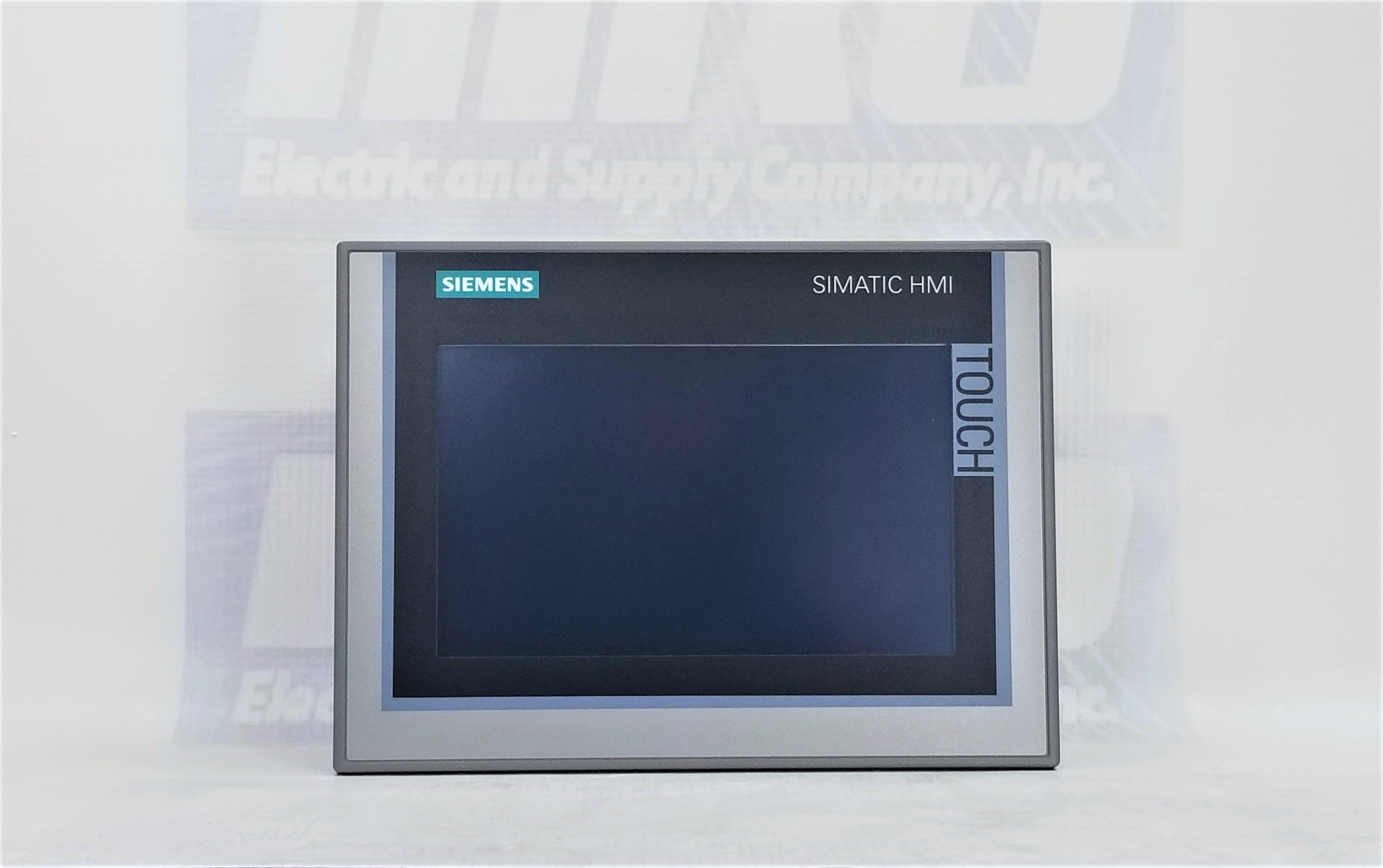
The Siemens TP700 line (like the 6AV2124-0GC01-0AX0), stand out as a premier choice for demanding applications. The TP700 Comfort Panel is a 7-inch touchscreen device that embodies a perfect blend of powerful performance, stunning visualization, and rugged industrial design. Let’s explore the key features that make it an indispensable tool for modern automation.

Read more: Product Spotlight: Siemens TP700

Key Features

Brilliant High-Resolution Visualization

At the heart of the TP700 is a 7-inch widescreen TFT display with a resolution of 800 x 480 pixels (WVGA). Its screen consist of 16.7 million. The display supports true color depth, allowing for incredibly detailed and nuanced graphics. The use of photo-realistic images and smooth gradients make system status intuitive to understand at a glance.

Additionally, the modern widescreen aspect ratio provides more horizontal space for organizing controls, trends, and alarm displays. This reduces the need for navigation and keeping more critical information visible simultaneously.

Connectivity

The TP700 is programmed seamlessly within Siemens’ Totally Integrated Automation (TIA) Portal engineering framework. This unified environment allows for effortless integration and significantly reduces configuration time. The TP700 also comes with a built-in 2-port PROFINET switch. This enables simple daisy-chaining to other devices like PLCs or drives without the need for external switches. The result is easier cabinet wiring. Additionally, it supports other industrial protocols, including PROFIBUS, Modbus, and OPC UA. This makes the TP700 versatile for connecting to a vast ecosystem of third-party devices and IT systems.


Enhanced Security and Data Logging

The TP700 supports extensive user management with various permission levels. Users can control which operators have access to specific functions, parameters, or screens. This ensures security and preventing unauthorized changes. The panel can also store and process data directly on its internal memory or to an external SD card. This is essential for batch processes, quality tracking, and historical analysis for diagnostics and optimization.

TP700 HMI Screen


Who is the TP700 Comfort Panel For?

The Siemens TP700 is the ideal solution for a wide range of mid-to-high-end applications across all industries. One of the first uses that come to mind is machine building. The TP700 brings a high level of control for machines perform tasks like assembling, injection molding, or complex packaging. Another industry that benefits from TP700 is the treatment and processing industry. Think water and waste treatment or chemical processing. The automotive industry is also another obvious choice as the TP700 gives the operator precision access to the assembly robots.

Conclusion

The Siemens TP700 Comfort Panel is more than just an interface; it’s a strategic investment in operational intelligence. By combining a brilliant display, powerful processing, rugged construction, and seamless integration within the TIA Portal, it empowers operators, simplifies processes, and provides the reliability required for 24/7 industrial operation. For engineers and system integrators looking to build advanced, efficient, and future-proof control systems, the TP700 Comfort Panel represents a benchmark in HMI technology.


Looking For a TP700

Are you in the market for a TP700, either new or refurbished? Reach our team of experts and let them help you get your operation running.